

Modern autofocus can identify a subject and place the active focus area where it matters.
Autofocus modes can look confusing when you first move beyond a phone or fully automatic camera. Your menu may show AF-S, AF-C, One-Shot AF, AI Servo, Single-shot AF, Continuous AF, tracking, zones, spots, eye detection, and several focus-area sizes. The important point is that these controls answer two different questions: when should the camera refocus, and where in the frame should it look for focus?
This guide separates those decisions so you can choose autofocus settings deliberately instead of changing options at random. The names vary by camera brand and model, but the underlying choices are similar.
Table of Contents
Autofocus Modes: The Two Decisions You Need to Make
Most autofocus problems become easier once you stop treating autofocus as one setting. In practice, you usually choose a focus mode and a focus area.
- Focus mode controls how autofocus behaves over time. Does the camera focus once and hold that distance, or keep updating focus as the subject moves?
- Focus area controls where the camera is allowed to look for the subject. You might choose one small point, a larger zone, or let the camera use most of the frame.
Modern cameras may add subject recognition for people, eyes, animals, birds, vehicles, or other subjects. That recognition can make autofocus easier, but it does not replace the basic decision between a stationary-subject mode and a continuous tracking mode.
AF-S: Best Starting Point for Stationary Subjects

AF-S focuses once and is a practical choice for stationary subjects such as posed portraits.
AF-S generally means single autofocus. Nikon calls it Single-servo AF, while Sony uses Single-shot AF. On Canon cameras, the comparable still-subject mode is commonly called One-Shot AF. In this type of mode, the camera acquires focus and then holds it rather than continuously adjusting while you keep the shutter button half-pressed.
Use AF-S or its brand equivalent when the subject is not meaningfully changing distance from the camera. Typical examples include landscapes, architecture, still life, products, posed portraits, and many travel scenes.
A practical AF-S setup
- Choose AF-S / Single-shot / One-Shot AF.
- Choose a single point or small focus area when you need precise control.
- Place the point over the detail that matters most.
- Half-press the shutter to focus, confirm focus, then take the photograph.
For a portrait, that important detail is usually the eye closest to the camera. For a landscape, the best focus distance depends on the scene and the depth of field you need; autofocus mode alone does not determine how much of the image will appear sharp.
AF-C: Use Continuous Autofocus for Moving Subjects
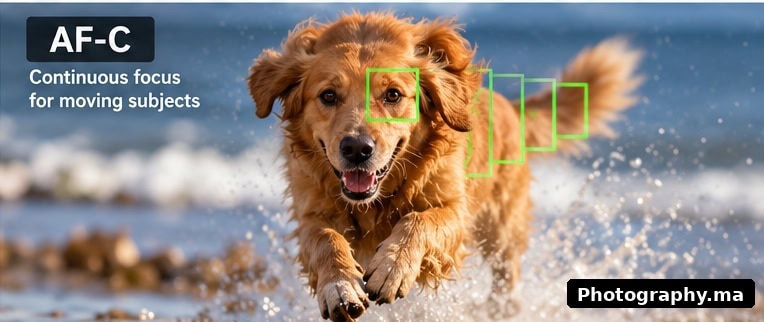
AF-C continuously updates focus while a moving subject changes distance from the camera.
AF-C means continuous autofocus. Sony and Nikon use the AF-C label, while Canon commonly uses Servo AF or AI Servo terminology depending on the camera. With continuous autofocus, the camera keeps updating focus while autofocus remains active. That makes it the logical starting point when the subject is moving toward you, away from you, or unpredictably through the frame.
Use AF-C for children running, pets, sports, wildlife, cyclists, vehicles, and candid subjects whose distance changes while you shoot. It is also useful when you are moving relative to the subject.
A practical AF-C setup
- Select AF-C / Continuous AF / Servo AF.
- Start with a zone, tracking area, or subject-detection option rather than an extremely tiny point for unpredictable motion.
- Place the starting area on the subject and activate autofocus.
- Keep autofocus active as you follow the subject and shoot when the moment is right.
A wider area can make it easier to keep a fast subject inside the active autofocus region, while a smaller area gives you more control when the background contains distractions. The best choice depends on subject size, speed, direction, and how cluttered the scene is.
AF-S vs AF-C: A Simple Decision Rule
| Situation | Starting focus mode | Why |
| Landscape or architecture | AF-S / One-Shot | The subject is stationary. |
| Posed portrait | AF-S or eye AF in a suitable still mode | You want precise focus on a stable subject. |
| Walking person | AF-C / Servo | Distance can change between frames. |
| Children or pets playing | AF-C / Servo | Movement is unpredictable. |
| Sports or wildlife | AF-C / Servo | Continuous adjustment is usually necessary. |
| Still life or product | AF-S / One-Shot | Precise, repeatable focus is more important than tracking. |
Treat this table as a starting point, not a rigid rule. A stationary subject can begin moving, and modern subject-detection systems can work differently depending on the camera. Your camera manual remains the authority for the exact behavior and names of its autofocus options.
Focus Area Is Different From Focus Mode
A common beginner mistake is to change AF-S to AF-C when the real problem is the focus area. Focus mode controls when the camera refocuses; focus area controls where it searches.
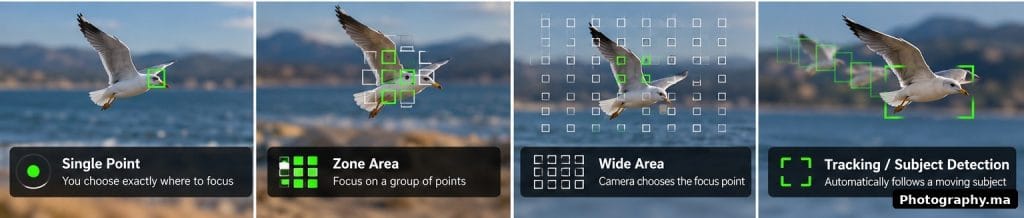
Single Point, Zone Area, Wide Area and Tracking give the camera different amounts of freedom to choose focus.
Single point or small spot
Use a small selectable point when you need to tell the camera exactly what should be sharp. It is useful for static portraits, details, products, architecture, and scenes where the foreground and background could confuse automatic selection.
Zone or expanded area
A zone gives the camera a larger region in which to find or follow the subject. It is often easier than a tiny point for people, pets, sports, and other subjects that move unpredictably. However, if several objects at different distances fall inside the zone, the camera may choose something you did not intend.
Wide or auto-area autofocus
In a wide or automatic area, the camera can search a large part of the frame. This works especially well when the camera can reliably recognize the intended person, eye, animal, or other supported subject. In a busy scene, however, giving the camera the whole frame can also give it more opportunities to select the wrong subject.
Subject Detection and Eye Autofocus
Subject detection is one of the most useful developments in modern autofocus. Depending on the model, the camera may recognize a face, eye, animal, bird, vehicle, or another supported subject and place focus on it automatically.
For portraits, eye detection can reduce the need to move a tiny focus point over an eye for every composition. For moving subjects, subject recognition combined with AF-C can help the camera continue following the intended subject.
Do not assume the camera will always know your intention. If two people overlap, an animal turns away, the subject is very small, or the background is visually dominant, you may need to select a smaller area, choose a different detected subject, or return to a manually positioned point.
Brand Names: Nikon, Canon and Sony
Camera makers use different labels, so focus on the behavior rather than memorizing every brand name.
| Purpose | Nikon | Sony | Canon |
| Stationary subject | AF-S | AF-S / Single-shot AF | One-Shot AF |
| Moving subject | AF-C | AF-C / Continuous AF | Servo AF / AI Servo on many models |
Exact menus vary by model and generation. Some cameras also offer automatic modes that switch behavior, additional tracking options, or video-specific autofocus modes. Check the manual for your camera before assuming a label behaves identically across brands.
Practical Autofocus Settings for Common Subjects
Portraits
For a posed portrait, start with AF-S and a small focus area, or use face/eye detection if your camera provides reliable control over which eye or person is selected. For a person walking toward the camera, switch to AF-C and keep the active area on the face or upper body.
For more portrait fundamentals, see Portrait Photography Tips for Beginners.
Children, pets and casual action
Start with AF-C and a zone or tracking area large enough to keep the subject inside it. If the camera repeatedly jumps to the background, reduce the focus area or choose a more specific subject-detection setting.
Landscapes
AF-S with a single point is a straightforward starting point because the scene is usually stationary. Place focus deliberately rather than assuming the camera’s nearest automatic point is always the best choice. Remember that aperture and focus distance affect depth of field, so autofocus is only one part of landscape sharpness.
Sports and wildlife
Use AF-C and choose an area that matches how predictable the subject is. A smaller tracking area can help isolate a subject from a busy background; a larger zone can be easier when movement is fast and erratic. Continuous autofocus also needs a shutter speed appropriate for the motion. Perfect focus cannot remove motion blur caused by a shutter speed that is too slow.
Why Autofocus Misses
When an image is not sharp, first determine whether the problem is actually focus. Blur can come from missed focus, camera shake, subject movement, insufficient depth of field, atmospheric conditions, or optical limitations.
- Low contrast: a plain wall, clear sky, or low-detail surface can give autofocus little information to work with.
- Very low light: autofocus performance generally becomes more difficult as light and contrast decrease.
- Foreground obstacles: fences, branches, glass, or another person can attract the focus system.
- Multiple distances inside a large focus area: the camera may choose a different subject than you intended.
- Subject too small in the frame: tracking may have too little information to identify or follow it reliably.
- Lens too close to the subject: every lens has a minimum focusing distance; autofocus cannot overcome that physical limit.
If your photo is soft but the focus point appears correct, use the troubleshooting steps in How to Take Sharp Photos.
A Beginner Autofocus Troubleshooting Checklist
- Confirm the lens and camera are set to autofocus rather than manual focus.
- Ask whether the subject is stationary or moving. Choose AF-S for stationary subjects and AF-C for meaningful movement as a starting point.
- Check the focus area. If the camera selects the background, make the area smaller or reposition it over the subject.
- If the subject moves unpredictably, try a wider zone or tracking area instead of a tiny point.
- Increase shutter speed if the subject is sharp in some frames but motion is smeared in others.
- Increase available light or choose a higher-contrast detail if autofocus is hunting.
- Check that you are not closer than the lens’s minimum focusing distance.
- Review the image at high magnification and identify where the camera actually focused before changing several settings at once.
Autofocus and Exposure Settings Work Together
Autofocus does not control exposure, but focus and exposure decisions interact in real shooting. For action, AF-C may track the subject correctly while a slow shutter speed still produces motion blur. For portraits at very wide apertures, focus can be accurate on one eye while the other eye falls outside the shallow depth of field.
If ISO, aperture, and shutter speed are still unfamiliar, read ISO, Aperture, and Shutter Speed Explained and Best Camera Settings for Beginners.
Should You Use Back-Button Focus?
Back-button focus moves autofocus activation from the shutter button to a button on the rear of the camera. Some photographers like it because it separates focusing from taking the picture, especially when tracking moving subjects or when they want to stop autofocus without changing modes.
It is not required for sharp photos, and beginners do not need to adopt it immediately. First learn AF-S, AF-C, and focus-area selection with the normal shutter-button method. If you later find that refocusing every time you press the shutter is getting in your way, back-button focus is worth testing.
When Manual Focus Is the Better Choice
Autofocus is usually the fastest option, but manual focus still has useful roles. Consider manual focus when autofocus repeatedly hunts in very low contrast, when you are photographing through foreground obstacles, when the camera keeps selecting the wrong plane, or when you want a fixed focus distance for a carefully controlled tripod composition.
For macro work and some tripod-based landscapes, magnified live view or focus peaking can help with precise manual adjustment if your camera supports those tools. The goal is not to prove that manual focus is more advanced; it is simply to use the method that gives you reliable control.
A 10-Minute Autofocus Practice Exercise
You can understand autofocus modes faster by testing them on the same subject rather than reading menu descriptions.
- Place a stationary object several meters away. Select AF-S and a single point. Focus, recompose slightly, and notice when focus stays locked.
- Ask someone to walk slowly toward you. Switch to AF-C and keep the focus area on the person while taking several frames.
- Repeat with a small point, then a larger zone. Compare how easy it is to keep the subject selected.
- Try a scene with a distracting foreground or background. Observe when a wide area chooses the wrong object and when a smaller area gives you better control.
- Review the images at high magnification and separate focus errors from motion blur.
This short exercise teaches the most important lesson: autofocus settings should respond to subject behavior. There is no single autofocus mode that is best for every photograph.
Autofocus Modes: Quick Reference
| If this is happening… | Try this first |
| Subject is still | AF-S / One-Shot + single point or small area |
| Subject moves toward or away from you | AF-C / Servo + tracking or suitable zone |
| Camera keeps focusing on the background | Use a smaller focus area and place it on the subject |
| Fast subject keeps leaving a tiny focus point | Use a larger zone or tracking area |
| Portrait eye is not consistently sharp | Use eye detection if reliable, or a small point on the near eye |
| AF hunts on a plain or dark subject | Aim at a higher-contrast detail, add light, or consider manual focus |
Frequently Asked Questions
Is AF-S or AF-C better?
Neither is universally better. AF-S is a practical starting point for stationary subjects; AF-C is designed to keep updating focus when subject distance changes.
Should beginners use automatic focus-area selection?
It can work well when the scene is simple or subject recognition is reliable. A single point or smaller area gives you more control when the camera keeps choosing the wrong object.
Is eye autofocus always accurate?
No. It can be extremely useful, but performance depends on the camera, lens, light, subject size, pose, and obstructions. Confirm the selected eye or subject when the photograph matters.
Does AF-C make moving photos sharp automatically?
No. AF-C helps maintain focus, but you still need a shutter speed fast enough for the subject’s motion and enough depth of field for the result you want.
Do I need back-button focus?
No. It is an optional control method. Learn the basic autofocus modes and areas first, then test back-button focus if separating autofocus from the shutter release solves a real problem for you.
Final Takeaway
Autofocus becomes much simpler when you make two decisions separately. First, decide whether the subject is stationary or moving: start with AF-S for a stationary subject and AF-C for a moving one. Second, choose how much of the frame the camera should search: use a small point for precision and a wider zone or tracking area when movement makes a tiny point difficult to keep on the subject.
From there, subject detection, eye autofocus, and advanced tracking are tools that can make the job easier, not replacements for understanding what the camera is doing. Practice with one subject, change one autofocus setting at a time, and review where the camera actually focused. That approach will improve your results faster than memorizing every menu option.
Authoritative External References
- Sony — AF-S vs AF-C and autofocus basics
- Sony — Focus Area setting guide
- Nikon — Photography Glossary: AF Area Modes
Image Plan for WordPress
- Featured image: camera viewfinder or mirrorless camera showing an autofocus point over a subject. ALT: “autofocus modes for beginner photographers”.
- Inline image 1: simple educational graphic comparing AF-S and AF-C. ALT: “AF-S vs AF-C autofocus modes explained”.
- Inline image 2: diagram comparing single-point, zone and wide focus areas. ALT: “camera autofocus focus areas and focus points”.
- Inline image 3: moving subject with tracking box or focus area illustration. ALT: “continuous autofocus tracking a moving subject”.
Internal Linking Notes
Links already embedded in the article: Portrait Photography Tips for Beginners; How to Take Sharp Photos; ISO, Aperture, and Shutter Speed Explained; Best Camera Settings for Beginners.After publishing this new guide, update “How to Take Sharp Photos” so its short AF-S / AF-C section links back to this article. That makes this new page the Depth Ownership page for autofocus modes.
7 thoughts on “Autofocus Modes Explained: AF-S, AF-C and Focus Areas for Beginners”
Comments are closed.