
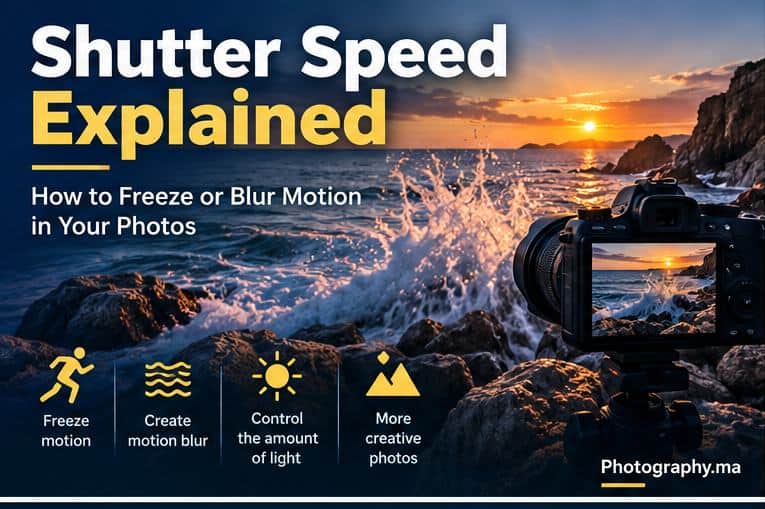
Shutter speed in photography controls how long the camera records light for an exposure. It also determines how movement is rendered: a fast shutter speed can freeze action, while a slower shutter speed can turn movement into intentional blur.
For beginners, the difficult part is rarely understanding that 1/1000 second is faster than 1/60 second. The real challenge is knowing how fast is fast enough for a runner, a bird, a handheld portrait, moving water, or a night scene.
This guide turns shutter speed into practical decisions. You will learn how to separate subject motion from camera shake, choose useful starting speeds, use Shutter Priority, balance shutter speed with ISO and aperture, and deliberately create motion blur.
Table of Contents
What Is Shutter Speed in Photography?
Shutter speed is the length of time the camera records light during an exposure. It is usually displayed as a fraction of a second—such as 1/1000, 1/250 or 1/60—or as whole seconds for longer exposures.
A shorter exposure records less movement during the frame and lets in less light. A longer exposure records movement over more time and lets in more light, assuming aperture and ISO remain unchanged.
This makes shutter speed both an exposure control and a creative control. The same moving subject can look frozen, slightly blurred or transformed into a streak depending on the exposure time.
For a manufacturer explanation and real examples, see Nikon’s Understanding Shutter Speed guide.
Fast vs Slow Shutter Speed
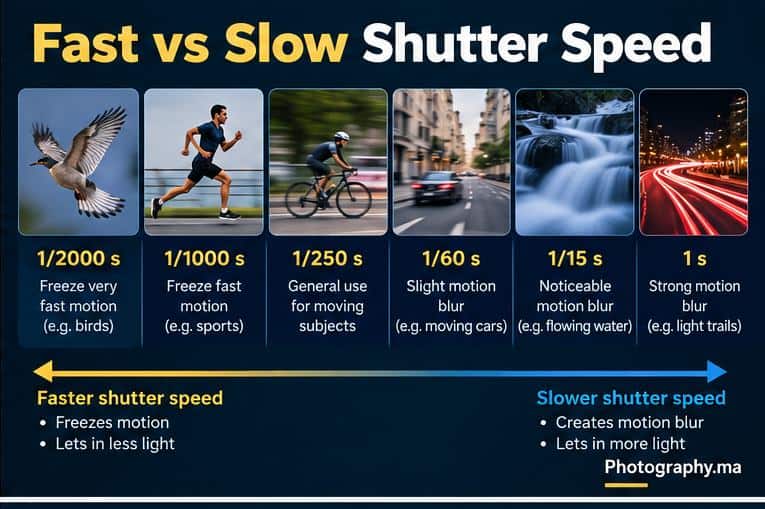
Fast and slow are relative to the subject. A speed that freezes a person standing still may blur a runner. A speed that freezes a runner may still show movement in a bird’s wings. Distance, direction of movement, focal length and how large the subject appears in the frame also affect the result.
Use the following as starting points rather than guarantees.
| Situation | Starting shutter speed | Goal |
| Stationary handheld subject | Around 1/125 s or faster | Reduce camera shake and small subject movement |
| Walking person | Around 1/250 s | Freeze ordinary movement |
| Running / active children | Around 1/500–1/1000 s | Freeze faster body movement |
| Sports / birds in flight | Around 1/1000–1/2000 s or faster | Freeze rapid action |
| Panning | Around 1/30–1/125 s | Keep subject relatively sharp while blurring background |
| Flowing water | About 1/4–1/30 s as a starting experiment | Show visible motion |
| Light trails / long exposure | Several seconds | Record movement over time |
These values are deliberately approximate. Test the result and adjust according to the actual speed of the subject and the effect you want.
How to Freeze Motion
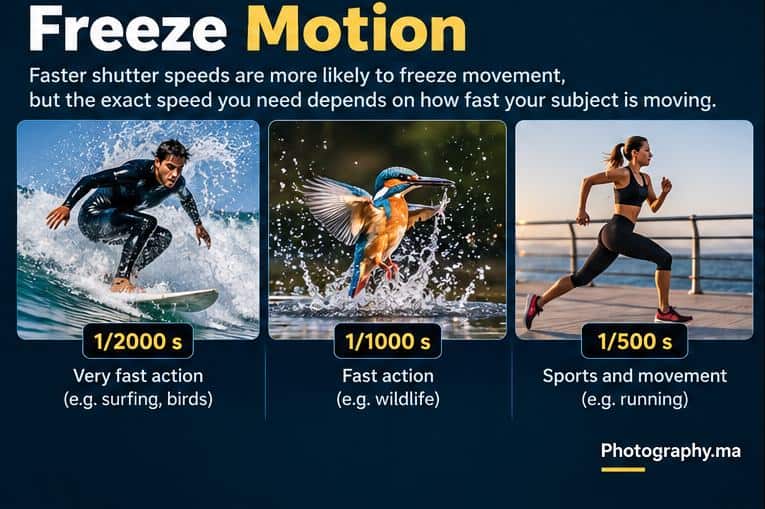
To freeze action, choose a shutter speed short enough that the subject does not move very far during the exposure. Faster action generally requires a faster shutter speed.
Start around 1/500 second for moderate action, then move toward 1/1000, 1/2000 or faster when the subject is rapid or when fine details—such as wings, water droplets or hair—must appear crisp. Nikon likewise presents 1/500 second as a useful starting point for fairly fast motion, while emphasizing that the required speed depends on the action.
Do not assume a high shutter speed guarantees a sharp image. Autofocus still needs to track the correct subject, and insufficient light can force ISO higher or aperture wider.
Shutter Speed for Sports, Wildlife and Moving Subjects
For a runner, cyclist or active child, begin around 1/500 second and inspect the result. If hands, feet or facial details still blur, increase the speed. For birds in flight and fast sports, 1/1000 to 1/2000 second is often a more useful starting range.
Movement toward the camera can look different from movement crossing the frame, and a close subject can show more apparent movement than a distant one. Treat the numbers as a testing point, not a universal prescription.
When the camera focuses on the wrong place rather than recording motion blur, use Photography.ma’s Autofocus Modes Explained guide.
Subject Motion vs Camera Shake
Not all blur has the same cause. Subject motion occurs because the subject changes position during the exposure. Camera shake occurs because the camera itself moves while the exposure is being recorded.
A faster shutter speed can help with both, but stabilization mainly addresses camera movement; it cannot freeze a moving person, animal or vehicle. This distinction matters when troubleshooting soft photographs.
If you are unsure why a photograph is soft, see How to Take Sharp Photos.
How Slow Can You Shoot Handheld?
There is no universal minimum handheld shutter speed. Focal length, stabilization, camera resolution, holding technique, subject movement and how large the image will be viewed all matter.
The traditional reciprocal guideline—using roughly the inverse of the focal length as a minimum speed—can be a useful starting idea, but it is not a guarantee. For example, 1/50 or 1/60 second has historically been suggested around a 50 mm focal length, but modern stabilization may allow slower speeds for stationary subjects while high-resolution cameras or poor technique may demand faster ones.
Make a short burst of test photographs and inspect them at useful magnification. Your own reliable handheld limit matters more than memorizing a formula.
How to Create Intentional Motion Blur
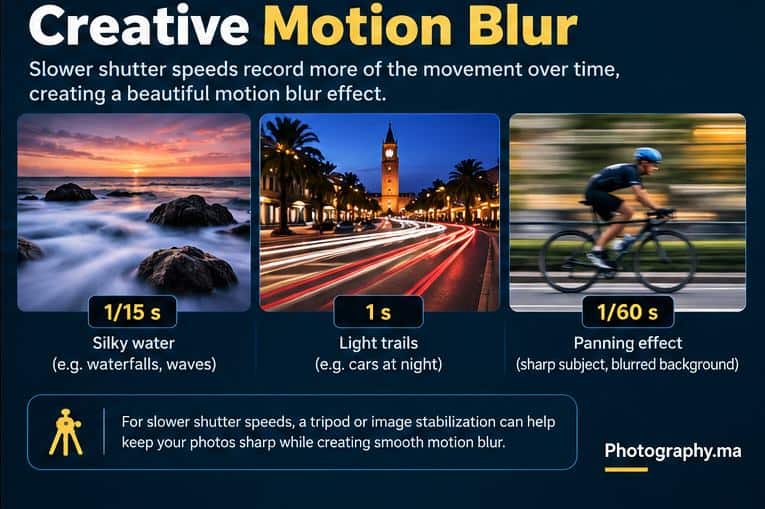
Motion blur is useful when movement is part of the story. Slower shutter speeds can smooth water, stretch vehicle lights into trails, show the movement of people through a scene or give wheels and backgrounds a sense of speed.
The correct shutter speed depends on how fast the subject moves and how much blur you want. A waterfall might show visible movement at 1/15 second, while long light trails may require several seconds. Experiment because the visual result is more important than matching a fixed number.
How to Pan With a Moving Subject
Panning means following a moving subject with the camera during a relatively slow exposure. If your movement matches the subject well, the subject can remain comparatively sharp while the background becomes streaked.
Try 1/60 or 1/125 second for a cyclist or vehicle as an accessible starting point. If the background remains too sharp, go slower. If the subject is impossible to hold sharply, go faster and practice the tracking movement before reducing speed again.
Continuous autofocus can help with unpredictable movement, but panning is a technique that improves through repetition. Expect unsuccessful frames while learning.
Shutter Priority: A Simple Way to Learn Motion
Shutter Priority—usually marked S or Tv—lets you choose the shutter speed while the camera selects an aperture that aims to produce the metered exposure. It is useful when motion is the main technical priority.
Choose a fast speed when you need to freeze action, or a slow speed when you want blur. Then watch whether the lens reaches its maximum or minimum aperture. If the camera cannot achieve the desired exposure, adjust ISO or reconsider the shutter speed.
Auto ISO can make Shutter Priority particularly practical for changing light because the camera has another variable available when aperture reaches a limit.
Shutter Speed, Aperture and ISO Work Together
A faster shutter speed reduces the time available for light to reach the sensor. To maintain a similar exposure, you may need a wider aperture, a higher ISO, more light, or a combination of these.
A slower shutter speed does the opposite: it records light for longer, which can allow a lower ISO or narrower aperture, but it also records more movement.
For the complete relationship, read ISO, Aperture, and Shutter Speed Explained.
If you want to understand the depth-of-field side of that decision, continue with Aperture in Photography.
When Should You Raise ISO?
Raise ISO when the shutter speed required to control motion cannot be achieved with the aperture and available light you have. A little more noise is often preferable to unwanted motion blur in a photograph where sharp action is the goal.
For example, if a runner needs 1/1000 second but the image is underexposed at your chosen aperture, increasing ISO may be the practical solution. Do not keep ISO artificially low if doing so destroys the result you actually need.
When a Tripod Helps
A tripod is valuable when the desired shutter speed is too slow to handhold reliably and the camera must remain fixed. Long exposures, light trails, some water effects and low-light landscapes are common examples.
Use a remote release, self-timer or another method that avoids unnecessary camera movement when appropriate. Stabilization behavior on a tripod varies by camera and lens, so follow the equipment manufacturer’s instructions rather than assuming it must always be on or off.
Common Shutter Speed Mistakes
- Using 1/60 second for every situation. It may work for a stationary scene but can blur moving people or animals.
- Keeping ISO too low. If freezing motion matters, raising ISO can be the better compromise.
- Blaming autofocus for motion blur. Check whether the focused area is sharp while moving parts are smeared.
- Expecting stabilization to freeze the subject. Stabilization helps camera movement, not subject movement.
- Using an extremely fast speed without a reason. It can force unnecessarily high ISO or a wider aperture.
- Using a slow speed handheld without checking the result. Review important details and stabilize the camera when needed.
A 10-Minute Shutter Speed Exercise
- Choose a repeatable moving subject: a person walking, a cyclist, flowing water or passing cars.
- Start in Shutter Priority with Auto ISO if your camera supports it.
- Make one frame at 1/1000 second, then 1/500, 1/250, 1/125 and 1/60 when conditions allow.
- Compare which parts of the subject remain sharp and where motion begins to appear.
- Choose the amount of motion you prefer instead of automatically selecting the sharpest frame.
- Try panning at 1/60 or 1/125 second and follow the subject smoothly through the exposure.
- Repeat the exercise in different light to see how aperture and ISO respond.
Quick Shutter Speed Decision Guide
- Want to freeze ordinary movement → start around 1/500 s and adjust.
- Fast sports or birds → try 1/1000–1/2000 s or faster when needed.
- Stationary handheld scene → choose a speed you can reliably hold at your focal length.
- Want moving water to blur → experiment below about 1/30 s and stabilize the camera as speeds get slower.
- Want light trails → use a tripod and exposures measured in seconds.
- Want a panning effect → start around 1/60–1/125 s and practice matching the subject’s movement.
FAQ
What is a good shutter speed for beginners?
There is no single best speed. Around 1/125 second can be a practical starting point for many stationary handheld subjects, while moving subjects often need 1/250, 1/500, 1/1000 or faster.
What shutter speed freezes motion?
It depends on the motion. Start around 1/500 second for moderate action and use 1/1000 to 1/2000 second or faster for rapid sports, wildlife or fine moving detail when necessary.
What shutter speed creates motion blur?
Slower speeds create more visible movement. Try 1/30 to 1/15 second for obvious movement, then move toward longer exposures if you want stronger blur.
Does image stabilization let me use slower shutter speeds?
It can reduce blur caused by camera movement, but it does not stop a moving subject. The benefit also varies by equipment and technique.
Should I use Shutter Priority or Manual mode?
Shutter Priority is excellent when motion is your main concern and you want the camera to handle aperture. Manual mode gives direct control when lighting and shooting conditions are predictable.
Final Takeaway
Shutter speed in photography is ultimately a decision about time. Use a faster exposure when you want to freeze movement, and a slower exposure when you want movement to remain visible. Then balance aperture and ISO so the exposure supports that creative decision.
Do not memorize one “correct” shutter speed. Start with a sensible range, inspect the photograph, identify whether any blur comes from the subject or the camera, and adjust until the motion looks the way you intended.
7 thoughts on “Shutter Speed in Photography: How to Freeze or Blur Motion”
Comments are closed.