
RAW vs JPEG is one of the first file-format decisions a new photographer encounters. RAW gives you more editing latitude and preserves more of the information captured by the camera, while JPEG gives you a smaller, processed file that is ready to view and share.
Neither format is automatically the right choice for every photographer. The useful question is simpler: how much editing flexibility, storage efficiency and speed does your workflow need?
This guide explains the practical differences and gives you a clear starting choice for travel, portraits, landscapes, family photos, difficult light and high-volume shooting.
RAW vs JPEG: The Short Answer
| If you want… | Choose | Why |
| Maximum editing flexibility | RAW | More tonal information and less processing baked into the file |
| Small files ready to share | JPEG | Camera processes and compresses the image |
| Both convenience and editing safety | RAW + JPEG | A shareable JPEG plus a RAW original |
| Long bursts / high volume | Often JPEG | Smaller files can reduce storage and buffer pressure |
| Difficult light / important photos | Often RAW | More room for careful highlight, shadow and color adjustments |
What Is a RAW File?
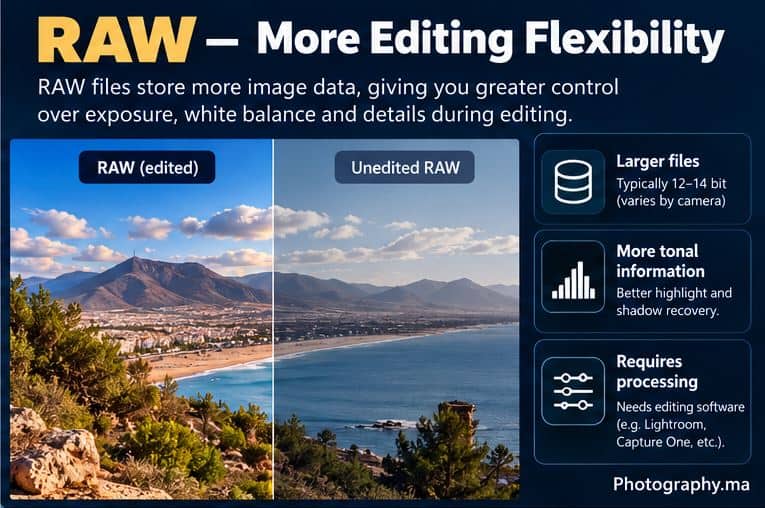
A RAW file stores minimally processed image data from the camera sensor together with metadata and camera-setting information. It is not a finished photograph in the same sense as a JPEG; it normally needs compatible software to be interpreted and exported.
Camera makers use their own RAW formats. Nikon calls its still-photo RAW format NEF, for example. Nikon states that NEF files retain the sensor information and, depending on the camera, may store 12-bit or 14-bit data, providing more tonal range than an 8-bit JPEG.
For the manufacturer explanation, see Nikon’s RAW vs JPEG guide.
The practical benefit is editing latitude. White balance, tone, highlights, shadows and color can usually be adjusted more aggressively before image quality begins to fall apart.
What Is a JPEG File?
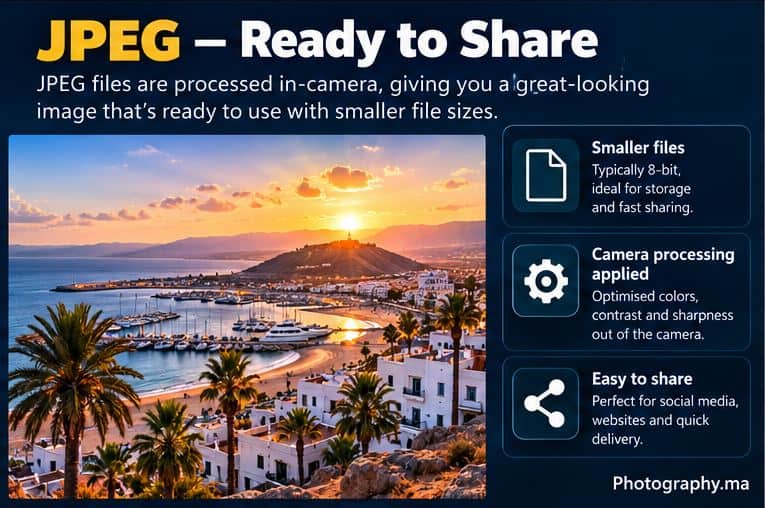
JPEG is a standardized, compressed image format. Your camera takes the captured data, applies choices such as white balance, contrast, color and sharpening according to its processing settings, then creates a smaller finished file.
That makes JPEG convenient. It can normally be viewed, uploaded, messaged or posted immediately without specialized RAW-processing software.
The trade-off is that more of the camera’s rendering is already baked into the file. Large corrections—especially repeated or aggressive edits—give you less flexibility than a RAW original.
RAW vs JPEG: Editing Flexibility
Editing flexibility is the strongest reason to choose RAW. Nikon notes that RAW files retain greater tonal gradation and dynamic-range information than JPEG, which can provide more latitude when adjusting highlights and shadows.
This does not mean a RAW file can rescue every exposure mistake. Severely clipped highlights can still be unrecoverable, and heavy shadow recovery can reveal noise. RAW simply gives you a better starting point when the photograph needs substantial correction.
JPEG is perfectly editable for modest adjustments. Cropping, small exposure changes, color tweaks and sharpening can work very well when the original exposure and white balance are already close.
RAW vs JPEG and White Balance
RAW is especially forgiving when white balance is wrong. The white-balance choice is largely treated as rendering information rather than permanently baking the same correction into the underlying RAW sensor data.
With JPEG, the chosen white balance has already been applied to the rendered image. You can still correct a color cast, but extreme changes offer less freedom.
For the full color workflow, read Photography.ma’s White Balance Explained guide.
RAW vs JPEG and the Histogram
The histogram shown by a camera is usually derived from a processed preview, not a direct graph of untouched RAW sensor data. That means picture style, white balance and contrast can influence the preview and histogram even when you are recording RAW.
For practical exposure checking, use Photography.ma’s Camera Histogram guide.
File Size, Memory Cards and Storage
RAW files are usually substantially larger than JPEGs because they retain more image information. Exact sizes vary enormously with camera resolution, bit depth, compression method and scene content, so there is no honest universal RAW-to-JPEG size ratio.
Larger files affect more than the memory card. They also increase backup space, transfer time and long-term storage requirements. If you shoot thousands of casual images, JPEG can make file management much simpler.
Burst Shooting and Camera Buffer
When shooting continuous bursts, file format can affect how quickly the camera buffer fills. Nikon specifically notes that larger RAW files can fill the buffer faster, while JPEG may be useful when you need many frames in a short period and the lighting is not especially difficult.
The exact burst depth depends on the camera, card speed, compression setting and other features. Check your camera manual rather than assuming one fixed number.
When RAW Is the Better Starting Choice
- Important portraits, weddings or events where you want maximum editing flexibility.
- High-contrast scenes where highlights and shadows may need careful adjustment.
- Landscapes where you expect significant tonal or color editing.
- Difficult or changing light where white balance may need correction.
- Photos you intend to print large or process carefully.
- Any situation where the image matters enough that extra storage and editing time are acceptable.
When JPEG Is the Better Starting Choice
- Family or casual photography when you want files ready immediately.
- High-volume shooting with little or no post-processing.
- Fast sharing to a phone, website or social platform.
- Situations where storage space matters more than maximum editing latitude.
- A controlled scene where exposure, white balance and camera rendering already look the way you want.
RAW + JPEG: A Useful Beginner Safety Net
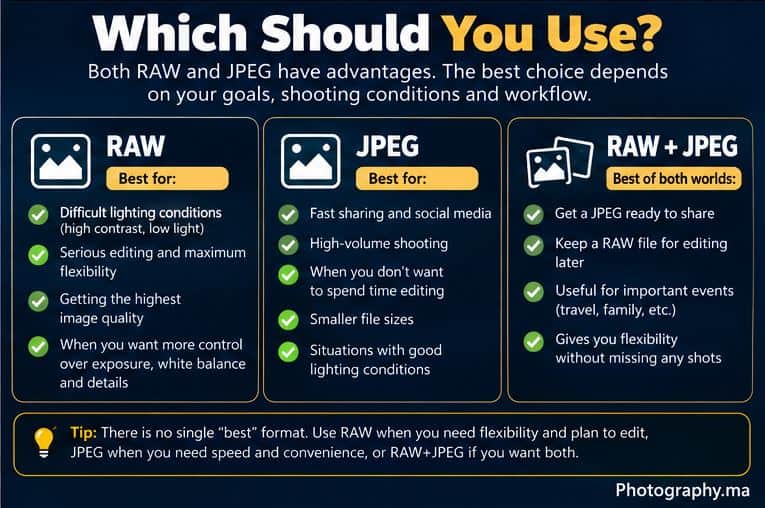
Many cameras can record RAW and JPEG simultaneously. This gives you a finished JPEG for quick use and a RAW file for deeper editing later.
The disadvantage is obvious: you create two files for every photograph, so cards and storage fill faster. It is useful while learning or for important events, but it is not mandatory once you know which workflow you prefer.
Does RAW Automatically Give Better-Looking Photos?
No. An unedited RAW preview may look flatter or less finished than the camera’s JPEG because the JPEG already includes the camera’s processing choices. RAW’s advantage is not that the untouched file must look better; it is that you have more control over how the final image is rendered.
A carefully exposed JPEG with pleasing in-camera settings can look excellent. File format does not replace good light, focus, composition or exposure.
A Practical Beginner Workflow
- If you do not edit photos yet, start with high-quality JPEG or RAW+JPEG.
- If you are learning Lightroom, Camera Raw, Capture One, NX Studio or another RAW editor, shoot RAW for a few sessions and compare the workflow.
- For an important shoot, use RAW or RAW+JPEG if storage allows.
- After a month, review how often you actually edit the RAW files and whether the extra storage is worthwhile.
- Choose the format that supports your real workflow rather than the format other photographers say you must use.
Common RAW vs JPEG Mistakes
- Believing RAW can fix any badly exposed photo. It cannot restore information that was never captured.
- Assuming JPEG means low quality. A well-made high-quality JPEG can be excellent.
- Shooting RAW without having a backup and storage plan.
- Using RAW+JPEG forever without ever using one of the two files.
- Judging RAW only by its initial preview. RAW is intended to be processed.
- Changing file format but ignoring exposure, focus and light—the decisions that matter more.
Quick Decision Guide
- Want to edit seriously? Choose RAW.
- Want to shoot and share quickly? Choose JPEG.
- Not sure yet? Try RAW+JPEG for a limited period.
- Storage is tight and photos are casual? JPEG is efficient.
- Lighting is difficult or the images are important? RAW gives you more flexibility.
- Need long continuous bursts? Test your own camera; JPEG often reduces file-size and buffer pressure.
FAQ
Should every beginner shoot RAW?
No. Beginners who do not want to edit may get more enjoyment from JPEG. RAW becomes valuable when you want greater control in post-processing.
Does RAW make photos sharper?
Not automatically. RAW gives you control over sharpening during processing, but focus accuracy, lens performance, shutter speed and technique determine whether the captured detail is actually sharp.
Can I convert RAW to JPEG later?
Yes. A normal RAW workflow processes the RAW file and exports a finished JPEG or another delivery format while preserving the RAW original.
Can I turn a JPEG back into RAW?
No. Saving a JPEG with a RAW-like filename or format cannot recreate the sensor information that was discarded or transformed when the JPEG was created.
Is RAW always 14-bit?
No. Bit depth depends on the camera and selected RAW settings. Nikon, for example, documents cameras that offer 12-bit and 14-bit RAW, while some newer models use different RAW options and compression methods.
What should I choose for Photography.ma-style learning exercises?
RAW+JPEG can be useful temporarily because you can compare the camera’s finished JPEG with your own RAW edit. Once you understand the difference, choose the format that fits your normal workflow.
Final Takeaway
RAW vs JPEG is a workflow choice, not a test of whether you are a serious photographer. RAW gives you more editing flexibility and usually larger files; JPEG gives you smaller, processed images that are fast to use and share. RAW+JPEG gives you both at the cost of storage. Start with the format that matches what you actually do after pressing the shutter.
3 thoughts on “RAW vs JPEG: Which Image Format Should Beginners Use?”
Comments are closed.