
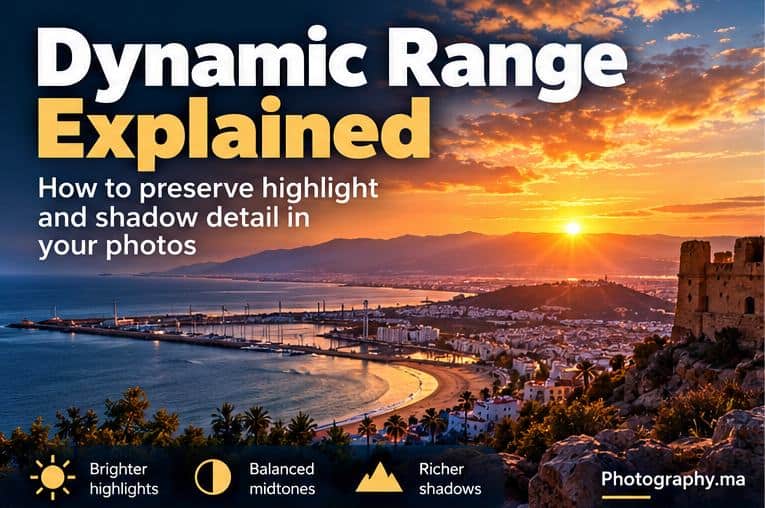
Dynamic range in photography describes the span between the darkest and brightest tones a camera can record with useful detail in a single exposure. You notice its limits when a scene contains a bright sky and deep shadows at the same time: expose for the sky and the foreground may become very dark; expose for the foreground and important highlights may turn pure white.
Understanding dynamic range in photography helps you to decide what to do when a scene contains both very bright highlights and deep shadows.
For beginners, the goal is not to memorize laboratory measurements. It is to recognize a high-contrast scene, decide which tones matter, expose deliberately, and know when one frame is enough—or when you need another technique.
This guide gives you a practical workflow for highlights, shadows, RAW files, histograms, exposure compensation and HDR bracketing without duplicating the basic exposure triangle.
Dynamic Range in Photography : The Simple Definition
Think of a scene as a scale from deep black to brilliant white. A camera can record only a finite portion of that brightness range in one exposure. When the scene fits inside the camera’s usable range, you can preserve meaningful detail in both bright and dark areas. When it does not, something has to give.
Nikon describes HDR as useful when the contrast range of a scene exceeds what the camera can capture in one exposure, such as a bright window inside a darker room or a sunlit landscape with deep shadows.
For a manufacturer example, see Nikon’s guide to High Dynamic Range Photography.
Highlights, Midtones and Shadows
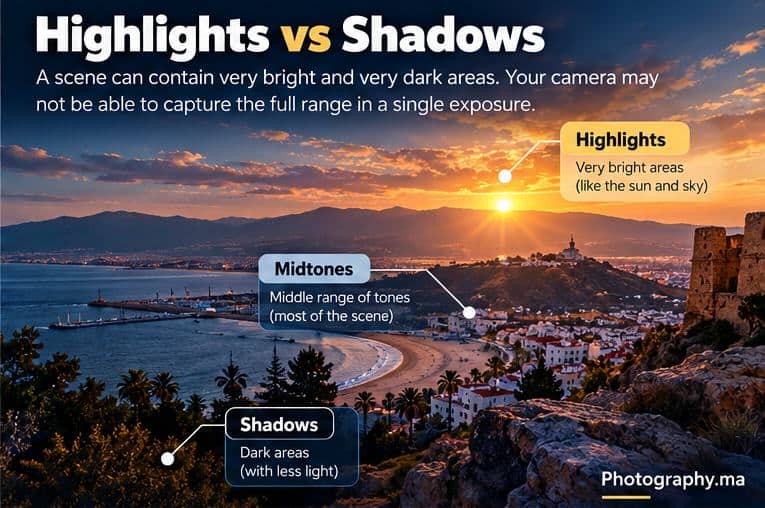
Highlights are the brightest parts of the photograph: clouds near the sun, reflections, white clothing in direct light, or bright windows. Shadows are the darkest areas: shaded faces, dark foliage, interiors and unlit foregrounds. Midtones sit between those extremes and often contain much of the scene.
Dynamic range becomes a practical problem when the important highlight and important shadow are farther apart than the camera can retain cleanly in one frame.
What Is Clipping?
Clipping happens when recorded tones hit the limit of the file or rendering and lose distinguishable detail. A clipped highlight can become featureless white; a crushed shadow can become featureless black.
Not every clipped pixel is a disaster. The sun itself, a small specular reflection or a light bulb may reasonably contain no texture. The question is whether the clipped area contains detail you actually need.
A bride’s white dress, textured clouds or a person’s face usually deserves more attention than a tiny reflection on chrome.
Why Important Highlights Often Need Protection
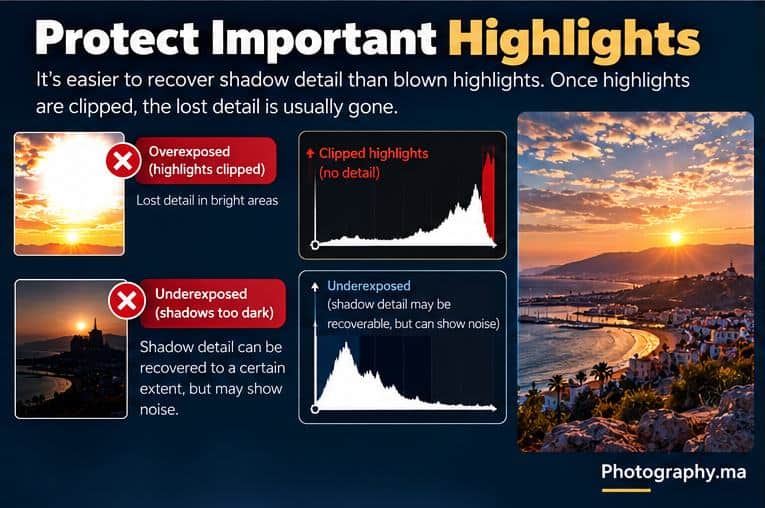
If an important highlight is truly clipped, the missing texture cannot be recreated simply by making the area darker in editing. Dark shadows may sometimes contain recoverable information, especially in a well-exposed RAW file, but aggressive lifting can reveal noise and weak color.
That is why a sensible high-contrast workflow is to watch critical highlights carefully while accepting that some shadows may remain dark. This is not a rule that every highlight must be preserved; it is a decision about which information matters to the photograph.
Use the Histogram Instead of Guessing
The rear screen is affected by display brightness and ambient light. A histogram gives you a more objective view of tonal distribution. Dark tones appear toward the left; bright tones appear toward the right.
If important bright detail is piling against the right edge, check for highlight clipping. If important dark detail is pushed hard against the left edge, inspect whether those shadows still contain useful information.
For the full workflow, read Photography.ma’s Camera Histogram guide.
Dynamic Range and Exposure Compensation
In Aperture Priority, Shutter Priority and other automatic-exposure situations, exposure compensation is often the fastest correction. If important highlights are too bright, try negative compensation. If the subject is too dark and the highlights have room, try positive compensation.
Start with a small change such as 0.3 or 0.7 EV, review the image and histogram, then adjust again if necessary. The exact amount depends on the scene; there is no universal value.
For practical +EV and −EV examples, use Photography.ma’s Exposure Compensation guide.
Dynamic Range and Metering Modes
Metering does not increase the sensor’s dynamic range. It changes how the camera evaluates brightness when choosing an automatic exposure. Matrix, Evaluative or Multi metering is a strong general default, while Spot metering can be useful when you deliberately want a small area to drive the reading.
A different metering mode may move the exposure, but it cannot make an extremely high-contrast scene fit into one capture if the scene exceeds the camera’s usable range.
If the distinction is unclear, see Photography.ma’s Metering Modes Explained.
Why RAW Helps in High-Contrast Scenes
RAW files retain more tonal information and editing latitude than a finished 8-bit JPEG. That can be valuable when you need to adjust highlights, shadows or white balance after capture.
RAW is not magic. If a highlight is truly beyond the captured data, a RAW editor cannot invent its original texture. Likewise, lifting very deep shadows can expose noise. RAW simply gives you a more flexible file for balancing difficult tones.
This is one reason RAW can be especially useful when dealing with dynamic range in photography.
For the complete file-format decision, read Photography.ma’s RAW vs JPEG guide.
A Practical High-Contrast Workflow
- Identify the important bright and dark areas before taking the photo.
- Take a normal exposure using your usual metering mode.
- Review the image and histogram; enable highlight warnings if your camera offers them.
- Decide whether any clipped highlight actually matters.
- If important highlights are lost, reduce exposure and shoot again.
- Check whether the shadows still contain enough detail for your intended result.
- If one exposure cannot retain the tones you need, consider changing the light, using a graduated filter, or bracketing multiple exposures.
When One Exposure Is Not Enough
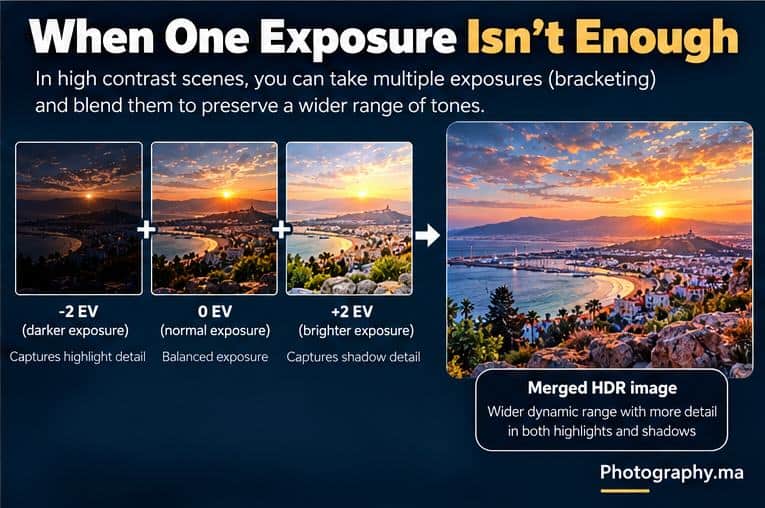
Some scenes simply contain more contrast than one exposure can hold. A classic example is a darker interior with bright daylight through the windows. Another is a landscape looking toward the sun with a deeply shaded foreground.
One solution is exposure bracketing: capture several frames at different exposure levels, then combine them into an HDR image. Nikon’s HDR guidance describes brackets that preserve highlight information in darker frames and shadow information in brighter frames.
The infographic shows −2 EV, 0 EV and +2 EV as an easy teaching example, not a universal prescription. The number of frames and spacing you need depend on the scene and camera.
When HDR Bracketing Works Well
- Static landscapes with extreme contrast.
- Architecture and interiors with bright windows.
- Tripod-based scenes where composition remains fixed.
- Situations where you need natural-looking detail in both bright and dark regions.
Moving people, leaves, waves or vehicles can create alignment and ghosting problems when multiple frames are blended. Modern software can reduce some of these issues, but a single well-timed exposure may still be preferable when motion is important.
Graduated ND Filters: Another Option
A graduated neutral-density filter darkens part of the frame—traditionally a bright sky—while leaving another part less affected. This can reduce the brightness difference before the image reaches the sensor.
Nikon’s guidance shows graduated ND filters being used to control a sky whose highlights would otherwise exceed the camera’s range. They are most practical when the bright and dark regions have a reasonably separable boundary, such as a horizon.
See Nikon’s graduated ND filter explanation.
Should You Always Brighten the Shadows?
No. Dynamic range is a technical capability, not a command to flatten every photograph. Deep shadows can create shape, mood and separation. A silhouette intentionally sacrifices shadow detail. Low-key photography depends on darkness.
Preserve shadow detail when it supports the subject. Let shadows become dark when that serves the image. The same principle applies to highlights: preserve meaningful texture, not every bright pixel at any cost.
Dynamic Range in Common Situations
| Situation | Main risk | Practical response |
| Sunset landscape | Bright sky + dark foreground | Protect important sky detail; evaluate RAW shadows; bracket if necessary |
| Backlit portrait | Face too dark or background too bright | Choose subject priority; use +EV, fill light or reposition |
| Interior + windows | Window highlights clip | Bracket exposures or add interior light |
| Snow | Camera may render scene too dark | Use histogram and positive compensation when needed |
| Night city | Bright signs + deep shadows | Protect important lights; accept some deep blacks |
| Silhouette | Shadow detail intentionally absent | Expose for the bright background |
Dynamic Range vs HDR: They Are Not the Same
Dynamic range is the span of brightness a scene, sensor or image can represent. HDR is a technique or output approach intended to represent a wider tonal range. You can benefit from strong single-exposure dynamic range without making an HDR composite, and you can create HDR by combining multiple exposures when one frame is insufficient.
Some cameras also offer built-in HDR or highlight/shadow optimization features. Their behavior varies by model, and some modes work only with JPEG. Check the manual before assuming they preserve the same information as a RAW workflow.
Five Common Dynamic Range Mistakes
- Trying to make every scene fit perfectly between pure black and pure white. Creative intent matters more than a mathematically complete tonal range.
- Trusting the rear-screen brightness without checking the histogram or highlight warnings.
- Underexposing excessively just to protect tiny unimportant highlights, then creating noisy shadows.
- Assuming RAW can recover truly clipped highlights.
- Using HDR automatically whenever contrast is high instead of first deciding whether the scene actually needs detail at both extremes.
A 10-Minute Dynamic Range Exercise
- Find a scene with a bright window or bright sky and a darker foreground.
- Take one frame at the camera’s normal meter reading.
- Take additional frames at −1 EV and +1 EV.
- Compare the important highlight detail in all three frames.
- Compare the shadow detail and noise potential.
- Look at each histogram and identify which tones approach the edges.
- Choose the single exposure that best matches your intention.
- Then decide whether combining exposures would genuinely improve the photograph.
This exercise teaches the central skill: dynamic range is not just a specification. It is a real-world exposure decision.
Quick Decision Guide
- Important highlights clipping → reduce exposure.
- Important subject too dark with highlight room available → increase exposure.
- High contrast but one RAW frame retains what you need → use the single frame.
- Highlights and shadows both matter but cannot fit → bracket exposures or modify the light.
- Bright sky and darker land with a clear boundary → consider a graduated ND filter.
- Dark shadows improve the mood → do not brighten them simply because you can.
FAQ
What does dynamic range mean in photography?
It is the span between the darkest and brightest tones that can be recorded or represented with useful detail.
Is more dynamic range always better?
More capture latitude can be useful, especially in difficult light, but it does not automatically make a stronger photograph. Lighting, exposure and creative decisions still matter.
Does a higher ISO reduce dynamic range?
Sensor behavior varies, but raising ISO generally does not create extra highlight headroom. For maximum capture latitude in a static scene, a low practical ISO is often a sensible starting point. Do not lower ISO so far that shutter speed or subject movement creates a worse problem.
Can RAW recover blown highlights?
RAW can provide more editing latitude than JPEG, but truly clipped information cannot be reconstructed. The safest approach is to monitor important highlights during capture.
Do I need HDR for sunsets?
Not automatically. Many sunsets fit in one well-exposed RAW file. Use bracketing only when the important bright and dark areas exceed what one exposure can retain.
Should I expose for highlights or shadows?
Expose for the tones that matter to the photograph while checking what happens to the other end of the range. In many high-contrast scenes, protecting important highlights is a useful starting strategy, but not an absolute rule.
Final Takeaway
Understanding dynamic range in photography is ultimately about managing the brightest and darkest parts of a scene. Start by identifying which tones matter, use the histogram to verify exposure, protect important highlights, use RAW when you want editing latitude, and bracket only when one exposure cannot preserve the information your photograph needs. The goal is not to record every tone—it is to keep the tones that serve the image.
1 thought on “Dynamic Range in Photography: How to Protect Highlights and Shadows”
Comments are closed.