
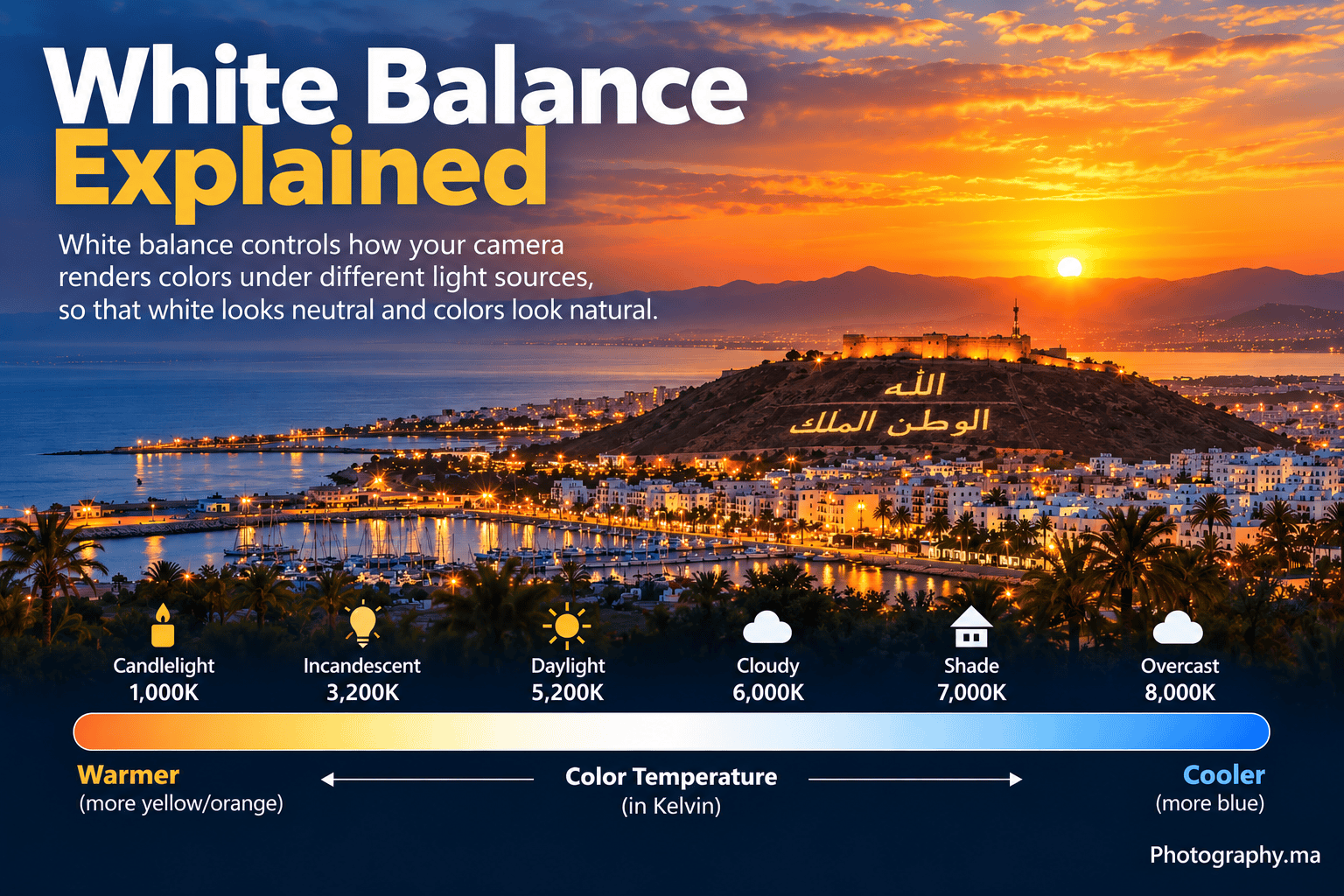
White balance controls how your camera renders color under different light sources. A scene illuminated by warm household bulbs, cool shade, daylight or mixed lighting can all look different to the camera, even though your eyes and brain adapt quickly.
For beginners, Auto White Balance is a sensible default in many situations. The important skill is knowing when AWB gives you an unwanted color cast, when a preset is more consistent, and when Kelvin or a custom white balance gives you more control.
This guide explains white balance as a practical shooting decision rather than a list of numbers to memorize.
What Is White Balance?
White balance is the camera’s method for compensating for the color of the light so neutral objects can be rendered neutral and other colors can look natural. Nikon explains that our eyes and brain compensate for different types of light automatically, while a digital camera uses its white balance setting to make a similar correction.
For an official overview and examples, see Nikon’s guide to setting white balance.
White balance does not change how much light reaches the sensor. It changes color rendering. That makes it different from aperture, shutter speed, ISO, metering and exposure compensation.
Color Temperature and Kelvin: The Part Beginners Often Reverse
Color temperature is commonly described in Kelvin (K). Lower-K light sources such as traditional incandescent lighting appear warmer or more orange. Higher-K conditions such as open shade appear cooler or bluer.
Here is the part that causes confusion: when you manually choose a lower Kelvin white-balance value, the camera applies a cooler correction; choosing a higher Kelvin value applies a warmer correction. In other words, the Kelvin number describes the light source, while the camera’s correction works in the opposite direction to neutralize that light.
Nikon documentation commonly places direct sunlight around 5,200 K, cloudy daylight around 6,000 K and shade around 8,000 K, while incandescent light is around 3,000 K. Exact preset values and available ranges vary by camera.
Auto White Balance: The Best Starting Point for Most Beginners

Auto White Balance, usually shown as AWB, asks the camera to evaluate the scene and choose a color correction automatically. It works well often enough that beginners do not need to abandon it simply because manual settings exist.
AWB is especially convenient when lighting changes quickly: travel, street photography, family photos, outdoor events or moving between sun and shade.
The limitation is consistency and intent. AWB may neutralize warmth that you wanted to preserve, or it may struggle when several light sources with different colors illuminate the scene. Different camera models also implement AWB differently.
- Start with AWB when the light is changing and the colors look natural.
- Switch to a preset when one known light source dominates and AWB looks wrong.
- Use Kelvin when you want repeatable manual control.
- Use a custom/preset measurement when accurate neutral color is important under difficult light.
White Balance Presets: Daylight, Cloudy, Shade and Incandescent
Most cameras provide named presets. The names are easier to use than Kelvin values when you recognize the lighting condition.
| Preset | Typical use | What it tends to do |
| Daylight / Direct Sun | Subjects lit by direct daylight | Neutral starting point for daylight |
| Cloudy | Overcast daylight | Adds warmth compared with daylight |
| Shade | Subjects in open shade | Adds a stronger warm correction |
| Incandescent / Tungsten | Traditional warm household bulbs | Adds a cooler correction |
| Fluorescent | Fluorescent lighting | Compensates for the selected fluorescent type |
| Flash | Flash illumination | Balances for the camera/flash preset |
Treat those descriptions as starting points. Modern LEDs, fluorescent lamps and mixed interiors can vary widely, so a named preset is not guaranteed to match every lamp carrying a similar label.
Kelvin White Balance: Lower vs Higher
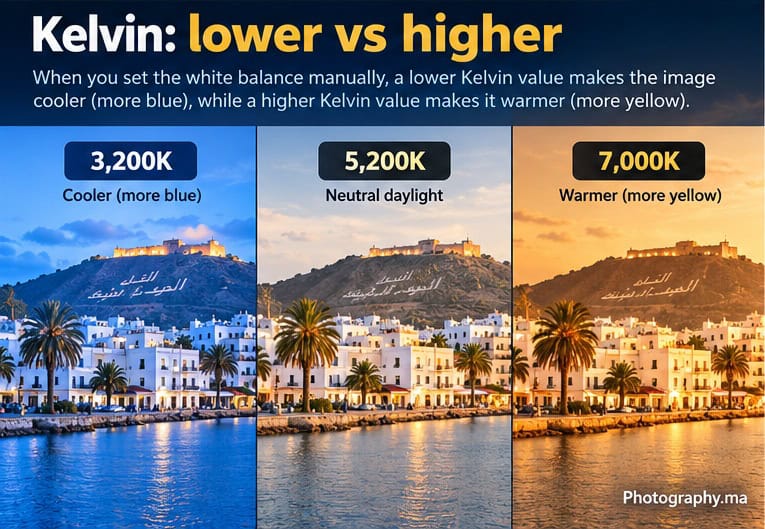
Kelvin mode gives you direct control over the camera’s white-balance target. A useful way to learn it is to watch the live view or electronic viewfinder while changing the value.
- Lower the Kelvin setting when the image looks too warm and you want a cooler result.
- Raise the Kelvin setting when the image looks too cool and you want a warmer result.
- Around daylight, values near 5,000–5,500 K are a common starting region, not a universal correct setting.
- Do not chase a number if the color already matches your intention.
Nikon’s own creative guidance notes that values higher than roughly daylight make the rendered image warmer, while lower values make it cooler. This is why Kelvin mode can be used both for neutral color and for deliberate mood.
Presets and Custom White Balance
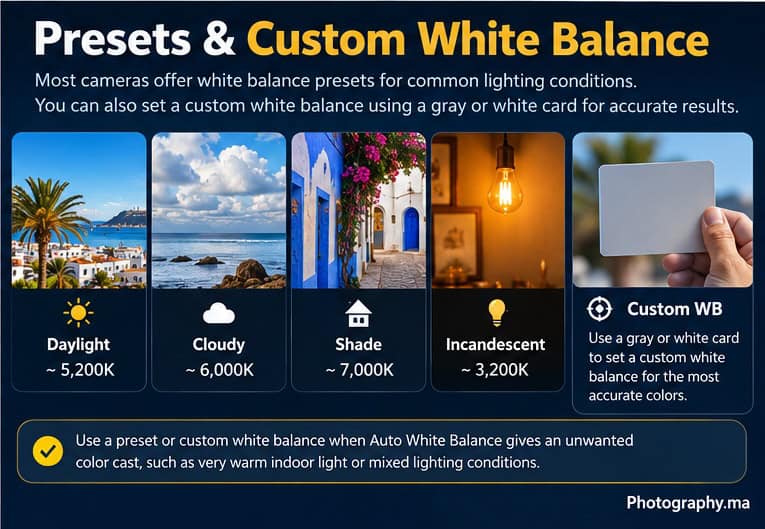
A custom white balance measures a neutral reference under the actual light. Depending on the camera, this may be called Preset Manual, Custom WB, PRE or another brand-specific name.
For reliable color, use a neutral gray target designed for photography when possible. A plain white object can work in some workflows, but a proper neutral reference is more dependable because not every white material is spectrally neutral.
Custom white balance becomes particularly useful for product photography, artwork reproduction, portraits where skin consistency matters, or repeated photographs under the same artificial lighting.
A Practical White Balance Starting Table
| Situation | Start with | Change if… |
| General outdoor photography | AWB | Colors look consistently too cool/warm |
| Sunny daylight | AWB or Daylight | You want repeatable daylight color |
| Overcast scene | AWB or Cloudy | Image feels too cool |
| Open shade portrait | AWB or Shade | Skin looks too blue/cool |
| Warm indoor bulbs | AWB or Incandescent | Orange cast is stronger than desired |
| Mixed window + artificial light | AWB, custom WB, or RAW workflow | Different parts of scene have different casts |
| Product / artwork | Custom WB | Accurate repeatable neutral color matters |
| Sunset | AWB, Daylight, Cloudy or Kelvin | AWB removes warmth you want to keep |
White Balance for Portraits
For portraits, skin is usually the best reality check. AWB may be excellent in clean daylight, but open shade can produce a cool cast and mixed indoor lighting can create difficult combinations.
If the face looks too cool, try Shade, Cloudy or a higher Kelvin value. If it looks too orange under warm bulbs, try Incandescent, a lower Kelvin value, or a custom measurement. Avoid correcting the background perfectly if doing so makes skin look unnatural.
For broader portrait technique, see Photography.ma’s Portrait Photography Tips for Beginners.
White Balance for Landscapes and Sunsets
Landscape color does not always need to be neutral. At sunrise or sunset, warm light is often part of the photograph. AWB can sometimes reduce that warmth because it is trying to neutralize the scene.
Daylight can preserve a consistent relationship to the changing light, while Cloudy or a higher Kelvin setting can deliberately emphasize warmth. Nikon also documents photographers using Kelvin and Cloudy settings creatively at sunrise and sunset.
For the broader field workflow, read Photography.ma’s Landscape Photography Tips for Beginners.
Mixed Lighting: Why One White Balance Cannot Fix Everything
Imagine a person beside a daylight window while a warm lamp illuminates the other side of the room. The two light sources have different colors. One global white-balance setting cannot make both sources perfectly neutral at the same time.
Your options are to choose which light matters most, turn off or change one light source, add matching gels to controlled lighting, reposition the subject, or correct selected areas later in editing. A custom white balance can improve the dominant light but cannot magically make two very different sources identical.
RAW vs JPEG: How Much Can You Fix Later?
If you shoot RAW, white balance is highly adjustable in post-processing because the RAW workflow retains much more flexibility over how the captured data is rendered. Nikon specifically notes that RAW shooters can adjust white balance later.
With JPEG, the camera has already rendered the image using the chosen white balance and other processing settings. You can still edit color afterward, but large corrections are less flexible and can be more destructive.
RAW flexibility is not a reason to ignore white balance completely. A sensible in-camera setting gives you a useful preview, helps you judge color while shooting and reduces correction work later.
White Balance and the Histogram
White balance can influence the rendered preview and individual RGB channels. That matters because an in-camera histogram is generally based on a processed preview rather than untouched RAW sensor data.
If you are learning exposure evaluation, use Photography.ma’s Camera Histogram guide.
Do not change white balance simply to force a histogram into a preferred shape. Set color for the scene and use the histogram as an exposure diagnostic.
Five Common White Balance Mistakes
- Assuming AWB is bad because it is automatic. It is a useful default when it produces the color you want.
- Memorizing Kelvin numbers as universal truths. Real light sources and camera presets vary.
- Reversing Kelvin correction: on the camera, raising the Kelvin setting makes the rendered image warmer; lowering it makes the image cooler.
- Trying to solve mixed lighting with one global setting. Different light sources may require a lighting change or selective editing.
- Neutralizing every sunset. Accurate color and intentional color are not always the same goal.
A 10-Minute White Balance Exercise
- Photograph the same neutral subject in daylight using AWB, Daylight, Cloudy and Shade.
- Compare which version looks neutral and which versions look deliberately warmer or cooler.
- Switch to Kelvin mode and photograph at roughly 3,200 K, 5,200 K and 7,000 K.
- Repeat the exercise under a warm indoor lamp.
- If your camera supports custom white balance, measure a neutral reference and compare it with AWB.
- Decide which setting is most accurate, then decide separately which result you actually prefer.
The exercise teaches the most important lesson: white balance has both a corrective role and a creative role.
Quick Decision Guide
- Colors look natural and light changes quickly: stay with AWB.
- Image looks too orange: try a lower Kelvin value or the appropriate artificial-light preset.
- Image looks too blue: try a higher Kelvin value, Cloudy or Shade.
- Need consistent color across many frames: use a fixed preset, Kelvin or custom WB instead of letting AWB vary.
- Need accurate neutral color: use a proper neutral reference and custom white balance.
- Mixed lighting creates different color casts: fix the lighting or prioritize one source rather than expecting one WB setting to solve both.
FAQ
Should beginners leave white balance on Auto?
AWB is a strong starting point. Move away from it when color is visibly wrong, consistency matters, or you want deliberate creative control.
What Kelvin value should I use for daylight?
Around 5,000–5,500 K is a common daylight starting region, and Nikon documentation commonly lists direct sunlight around 5,200 K. The exact useful value depends on the light, camera and intended rendering.
Why does a higher Kelvin setting make my photo warmer?
Because the camera is compensating for a light source it assumes is cooler. The color temperature of the source and the corrective color applied by white balance work in opposite directions.
Can white balance fix bad exposure?
No. White balance controls color rendering; exposure controls image brightness through aperture, shutter speed, ISO and automatic exposure decisions.
Does RAW mean white balance does not matter?
RAW gives you much more freedom to change white balance later, but a good in-camera setting still improves previews, consistency and workflow.
Final Takeaway
White balance is easier when you stop treating it as a hunt for one correct Kelvin number. Start with AWB, recognize unwanted color casts, switch to a preset or Kelvin when you need consistency, and use a custom neutral reference when color accuracy matters. Then remember that sometimes warm or cool color is part of the photograph rather than a problem to remove.
7 thoughts on “White Balance Explained: A Beginner’s Guide to Accurate Color”
Comments are closed.