
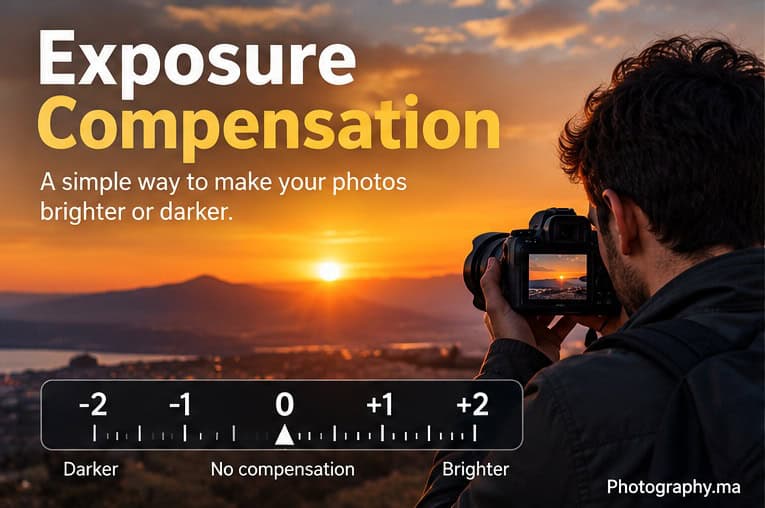
Exposure compensation is one of the fastest ways to fix a photo that looks too dark or too bright when the camera is choosing part of the exposure for you. Instead of rebuilding all your settings, you tell the camera: keep doing the automatic work, but make the result brighter or darker than your meter currently recommends.
For beginners, this is especially useful in Aperture Priority, Shutter Priority and Program modes. It also becomes valuable with Manual mode plus Auto ISO on many cameras. The exact controls and behavior vary by camera, so treat the settings in this guide as practical starting points rather than universal rules.
If you have just read Photography.ma’s Metering Modes guide, think of the relationship this way: metering decides how the camera evaluates brightness; exposure compensation tells the automatic exposure system how much brighter or darker you want the result.
What Is Exposure Compensation?
Exposure compensation changes the camera’s automatic exposure from its metered recommendation. Positive values such as +0.3 EV or +1 EV make the image brighter; negative values such as −0.3 EV or −1 EV make it darker. Setting compensation back to 0 returns the camera to its normal metered recommendation.
Nikon defines exposure compensation as a setting used to modify the exposure recommended by the camera’s light meter. See Nikon’s official photography glossary.
EV means exposure value in this context. Most cameras let you adjust compensation in small steps, commonly 1/3 EV. A one-stop change is a substantial adjustment: +1 EV asks for a brighter exposure, while −1 EV asks for a darker one.
The Simple Rule: Plus Makes It Brighter, Minus Makes It Darker
- + EV: use when the camera’s result is darker than you want.
- 0 EV: use when the camera’s recommendation already looks right.
- − EV: use when the camera’s result is brighter than you want.
The important phrase is “than you want.” Exposure compensation is not a magic correct-exposure button. It is a way to override the camera’s automatic recommendation based on the subject, the light and your creative intent.
Why Your Camera Sometimes Gets Brightness Wrong
A reflected-light meter sees brightness, not meaning. It does not inherently know that snow should look white, that a black jacket should stay dark, or that a face in front of a bright window is the most important part of the photograph. Modern metering systems are sophisticated, but difficult scenes can still produce a result that is technically reasonable and visually wrong for your intention.
Bright scenes can sometimes be rendered too dark, while very dark scenes can be rendered too bright. Backlighting is another common challenge: the bright background can influence the meter enough that the person in front of it becomes too dark.
This is why exposure compensation and metering modes work so well together. Keep a dependable metering mode for most situations, then use compensation when the camera consistently places the brightness somewhere you do not want it.
When to Use Positive Exposure Compensation (+EV)
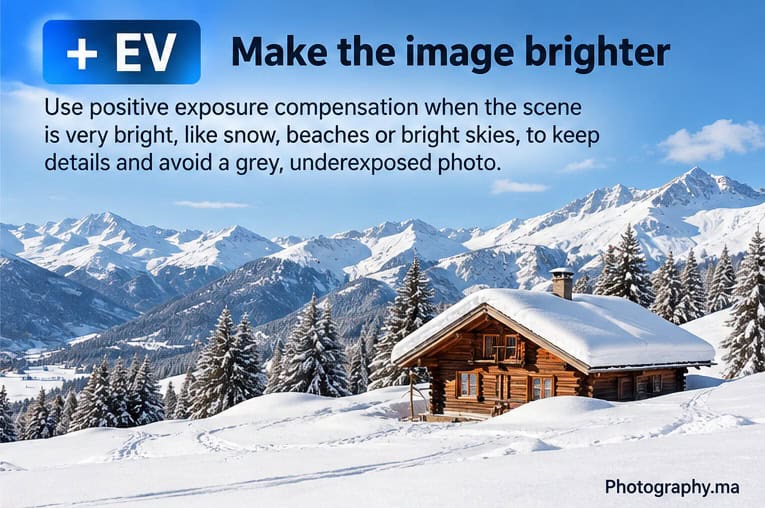
Positive exposure compensation is useful when the camera makes an important subject or a naturally bright scene look too dark. Snow is the classic example. A camera may try to reduce the brightness of a frame dominated by white, producing gray-looking snow.
A practical approach is to start small. If the image looks slightly too dark, try +0.3 EV. If that is not enough, try +0.7 EV, then +1 EV if the scene still needs more brightness. Nikon gives similar snow-shooting guidance: check the result and increase exposure compensation progressively if the snow is not rendered white.
- Snow, white sand or other very bright scenes that look gray.
- A backlit portrait where the face is too dark.
- A light-colored subject against a very bright environment when the subject needs more brightness.
- Any automatic-exposure result that is consistently darker than your intended image.
When to Use Negative Exposure Compensation (−EV)
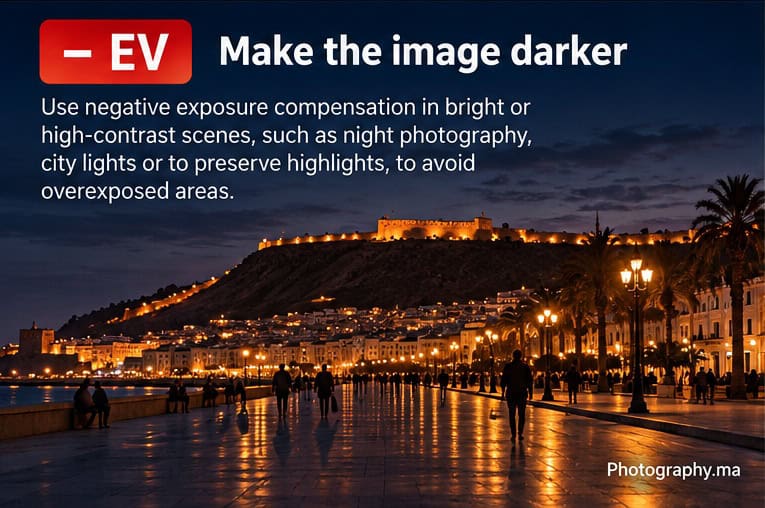
Negative exposure compensation is useful when the camera produces an image that is brighter than you want or when important highlights are being lost. Dark scenes are a common example: the meter may try to brighten a scene that is supposed to remain dark and atmospheric.
- Night scenes that look unnaturally bright.
- Stage or concert lighting where bright faces or costumes are clipping.
- Dark subjects or dark backgrounds that the camera tries to turn too bright.
- Sunsets where you want richer color and need to protect bright areas.
- Any automatic-exposure result where important highlights are too bright.
Again, start with a modest correction such as −0.3 EV or −0.7 EV, inspect the result and adjust further only when necessary.
A Practical Exposure Compensation Starting Table
| Situation | Starting point | What to check |
| Normal daylight scene | 0 EV | Subject brightness and highlights |
| Backlit portrait | +0.3 to +1 EV | Face brightness; watch background highlights |
| Bright snow / beach | +0.3 to +1 EV | Keep whites bright without clipping |
| Dark night scene | −0.3 to −1 EV | Preserve the intended dark mood |
| Sunset | 0 to −0.7 EV | Protect highlights and color |
| Stage / spotlight | 0 to −1 EV | Watch skin and bright costumes |
These values are starting points, not prescriptions. Metering mode, subject tone, dynamic range and camera behavior can all change the amount you need.
Real Example: A Backlit Portrait
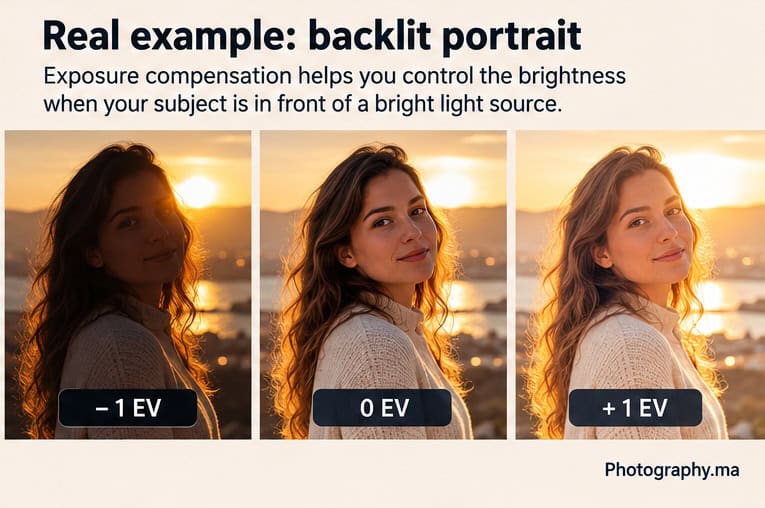
Imagine photographing a person with a bright sunset or window behind them. At 0 EV, the camera may protect some of the bright background while leaving the face darker than you want. Adding positive exposure compensation can brighten the face, but too much compensation can sacrifice background highlights.
- Start at 0 EV and take a test frame.
- If the face is too dark, try +0.3 EV or +0.7 EV.
- Check the face and the brightest background areas.
- Increase toward +1 EV only if the subject still needs it and the highlight tradeoff is acceptable.
- If the background is more important than the face, you may deliberately use less compensation instead.
There is no single correct value because the creative priority changes. Exposure compensation gives you a fast way to decide what matters most.
How Exposure Compensation Works in Aperture Priority
Aperture Priority is one of the easiest places to learn exposure compensation. You choose the aperture and usually the ISO or Auto ISO behavior; the camera chooses a shutter speed to reach its metered exposure. When you add compensation, the camera changes an automatic exposure variable to deliver a brighter or darker result.
For example, you might choose f/4 for a portrait and then use +0.7 EV because the face is too dark against a bright background. The camera may respond by using a slower shutter speed, a higher Auto ISO value, or another permitted automatic adjustment depending on your settings and camera.
How It Works in Shutter Priority
In Shutter Priority, you choose the shutter speed and the camera normally adjusts aperture to reach the target exposure. Exposure compensation asks the camera to shift that automatic exposure brighter or darker. If the lens reaches its maximum or minimum aperture, the camera may no longer be able to deliver the requested compensation unless Auto ISO or another automatic control has room to change.
What About Manual Mode?
With fixed ISO in full Manual mode, you already control aperture, shutter speed and ISO yourself. On many cameras, exposure compensation therefore does not change the recorded exposure in the same way it does in Aperture Priority or Shutter Priority; you change the exposure directly with your manual settings.
Manual mode with Auto ISO is different on many modern cameras. Because ISO remains automatic, exposure compensation can often tell the camera to choose a higher or lower Auto ISO value. Exact behavior varies by model, so check your camera manual before assuming this works the same way on every camera.
Exposure Compensation vs Metering Modes
Do not treat these controls as competitors. Metering mode changes how the camera evaluates the scene; exposure compensation changes the brightness target after that evaluation.
For most beginners, a strong workflow is to leave Matrix, Evaluative or Multi metering as the normal default and learn exposure compensation thoroughly. Change metering mode when you specifically need a different part of the scene to drive the measurement.
For the full explanation of Matrix, Center-Weighted and Spot metering, read Photography.ma’s Metering Modes Explained guide.
Exposure Compensation vs Changing ISO
Changing ISO and using exposure compensation are not conceptually the same action. ISO is one of the exposure controls. Exposure compensation is an instruction to the camera’s automatic exposure system. Depending on the shooting mode, the camera may respond to compensation by changing shutter speed, aperture, Auto ISO or a permitted combination.
If you are in full Manual mode with fixed ISO, simply adjust the exposure settings directly. If you are using an automatic or semi-automatic exposure mode, compensation is often faster because it preserves the creative setting you intentionally chose.
Use the Histogram and Highlight Warnings
Do not judge exposure only by how bright the rear screen looks. Screen brightness and ambient light can fool your eyes. Use the histogram and highlight warnings when the scene is difficult.
- If important highlights are clipping, reduce exposure or use negative compensation.
- If the important subject is too dark and highlights have room, increase exposure.
- Do not force every histogram into the middle. A night scene should contain many dark tones; a snow scene should contain many bright tones.
The goal is not a mathematically centered histogram. The goal is to preserve the tones that matter for the photograph you are making.
Five Common Exposure Compensation Mistakes
- Forgetting to reset compensation to 0. A value can remain active and affect the next scene.
- Adding +EV just because the room is dark. Judge the actual result, not the ambient light level alone.
- Using compensation to fix motion blur. A brighter target may force a slower shutter speed in some modes and make blur worse.
- Ignoring clipped highlights. A brighter face is not an improvement if critical highlights are destroyed.
- Changing metering mode and compensation simultaneously without knowing which change fixed the problem.
A 10-Minute Practice Exercise
Choose one stationary subject near a window or outdoors where the background is noticeably brighter or darker than the subject.
- Use Aperture Priority and your normal broad-frame metering mode.
- Take one photo at 0 EV.
- Take the same composition at −1 EV, −0.7 EV and −0.3 EV.
- Then shoot +0.3 EV, +0.7 EV and +1 EV.
- Compare the subject, background and histogram.
- Choose the frame that best matches your intention and explain why.
This simple exercise teaches more than memorizing a list of recommended EV values because you see how your own camera reacts.
Quick Decision Guide
| What you see | What to try |
| Photo is too dark | +0.3 EV, then reassess |
| Photo is too bright | −0.3 EV, then reassess |
| Face dark against bright background | Positive compensation if face is priority |
| Highlights clipping | Negative compensation |
| Snow looks gray | Positive compensation |
| Night scene looks washed out | Negative compensation |
| Result already matches your intent | Stay at 0 EV |
FAQ
Does +1 EV always double the brightness of the final-looking photo?
One stop represents a doubling of exposure in photographic terms, but the visual appearance of the finished image also depends on tone curves, JPEG processing, dynamic range and editing. Use the EV scale as an exposure control, then judge the photograph.
Should I leave exposure compensation at −0.3 EV to protect highlights?
Not as a universal rule. Some photographers choose a small negative bias for particular cameras or workflows, but beginners are better served by starting at 0 EV and correcting when the scene or camera behavior gives a reason.
Can exposure compensation fix a badly chosen shutter speed?
No. If motion is blurred because the shutter speed is too slow, choose a faster shutter speed or change the shooting strategy. Compensation controls exposure bias; it does not replace good shutter-speed decisions.
Is exposure compensation useful for RAW files?
Yes. RAW provides more editing flexibility, but getting exposure close in camera still helps preserve important tonal information and gives you a better starting point.
Do I need Spot metering to use exposure compensation?
No. Exposure compensation works with the camera’s automatic exposure system and can be useful with broad-frame metering, Center-Weighted or Spot metering. For beginners, broad-frame metering plus compensation is often the simplest starting workflow.
Final Takeaway
Exposure compensation is a fast communication tool between you and the camera. When the automatic exposure is darker than your intention, move toward +EV. When it is brighter than your intention or important highlights need protection, move toward −EV. Start with small adjustments, inspect the important tones and reset to 0 when the difficult scene is over.
Once this becomes instinctive, you can keep your attention on the subject instead of rebuilding exposure settings after every change in light.
3 thoughts on “Exposure Compensation Explained: When and How to Use It”
Comments are closed.